
TVGuide Feature
(Updated 2025-12-02)
“TVGuide” is a new addition to SuiteTV’s channel and program display options, inspired by the IHG RFP. It introduces a structured way to navigate channels and schedules through two dedicated screens: Channel Control Screen and Program Grid Screen.
Configuration
The behavior of SuiteTV’s channel and program display is controlled by the IPTV Mode setting in ClientConfig.json. Existing modes include:
0 → Static Listing
1→ Clickable Listing2→ EPG3→ Number Tunable Listing4→ WOSD
Now, 5 enables TVGuide.
Note: Update the IPTV Mode setting via “Site Config|Client” console.
Channel Control Screen
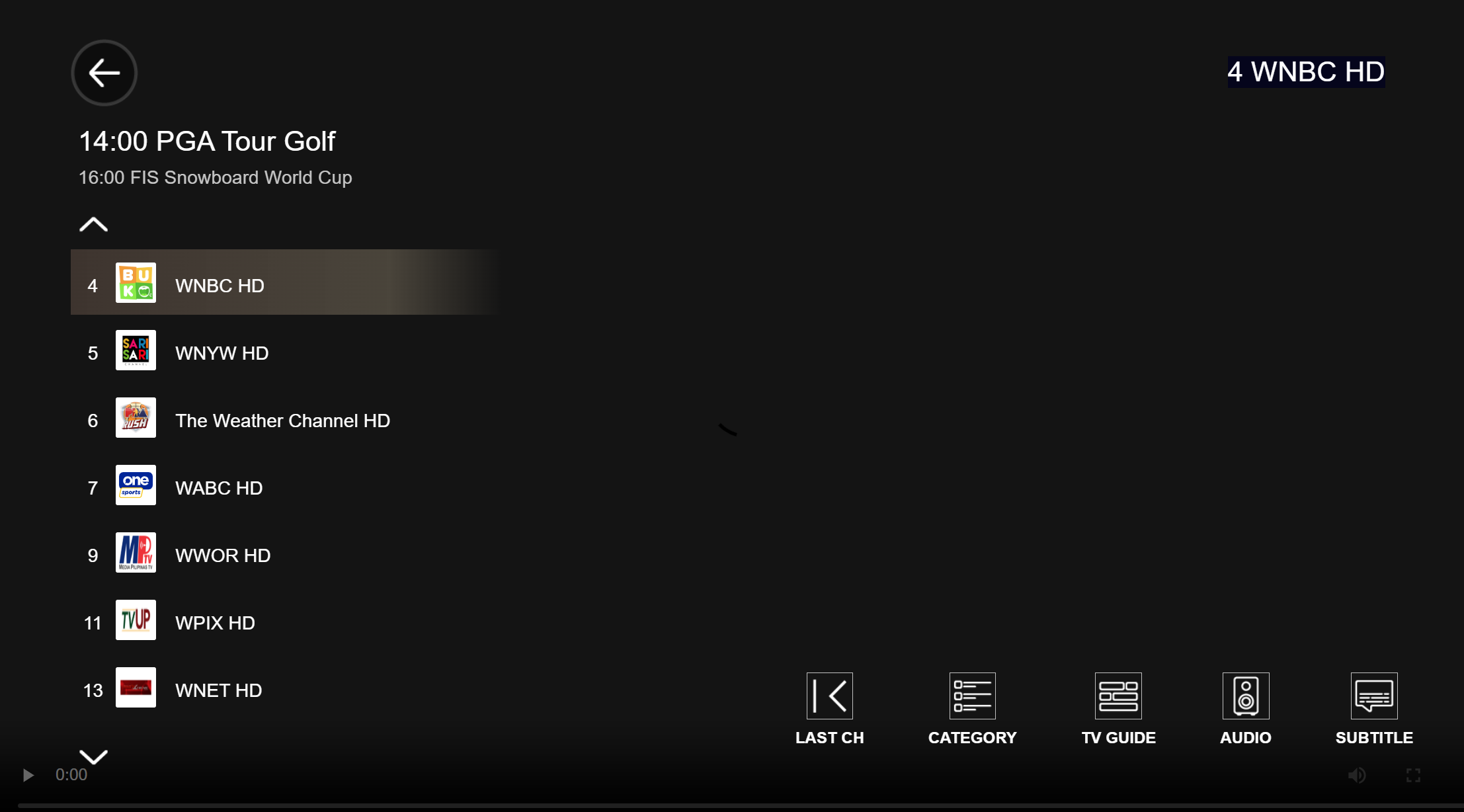
The Channel Control Screen appears when entering the TV Channel Mode.
Screen Behavior
Turns invisible after 10 seconds of no remote-control activity.
Becomes visible on any remote-control key except CHANNEL-UP, CHANNEL-DOWN, BACK and MENU.
When visible: BACK -> hides the screen.
When invisible: BACK -> exits the TV Channel mode to returns the Portal.
CHANNEL-UP -> tunes to the next channel up in the full channel list.
CHANNEL-DOWN -> tunes to the next channel down in the full channel list.
MENU -> exits TV Channel mode and returns to the Portal.
TVGuide Channel Control Screen provides the following controls that a user uses remote-control LEFT and RIGHT keys to highlight one of them.
Controls
Users navigate controls with remote-control LEFT and RIGHT keys. Available controls include:
Channel List Controls
Displays seven channels at a time (number, icon, name).
Current and next program for the focused channel appear at the top.
Remote-control actions:
UP/DOWN → change focused channel (and update visible set if needed).
ENTER → tune to the focused channel.
Last Channel Control
ENTER -> tunes to the last viewed channel.
Category Control
Shows channel categories (genres) with the current category designated.
UP/DOWN → shift designated category.
ENTER → updates Channel List to show channels in the selected category.
Note: Channel genres are managed via the SuiteTV Channel Console.
TVGuide Control
ENTER → switches to the Program Grid Screen.
Audio Control
ENTER → toggles the audio track of the current channel.
Subtitle Control
ENTER → toggles subtitle mode.
Program Grid Screen
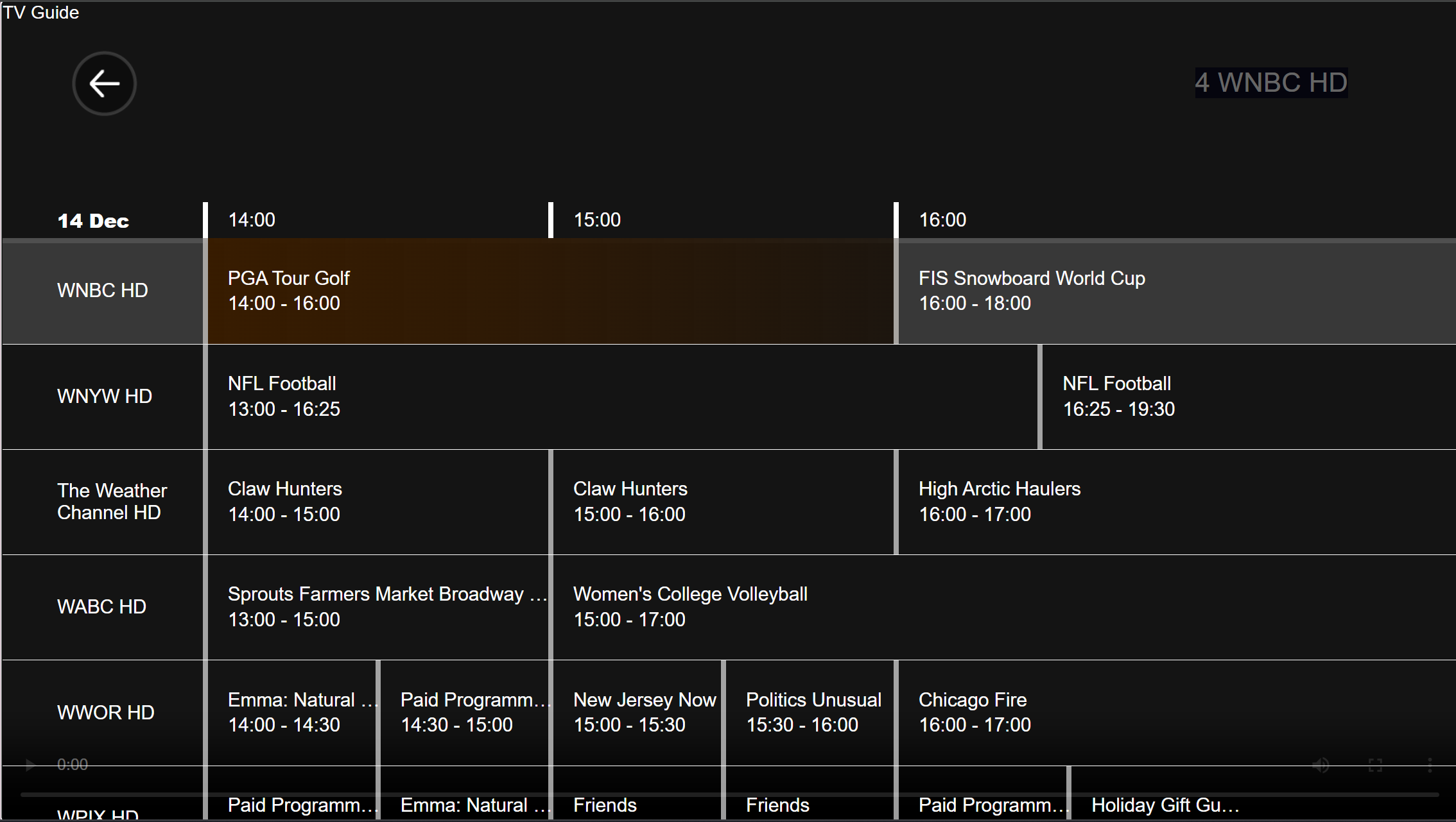
The TVGuide Program Grid Screen appears when the TVGuide control is highlighted and ENTER is pressed.
Screen Behavior
Displays a three-hour schedule starting from the current hour.
Shows five and a half channels at a time.
Remote-control actions:
TLEFT/RIGHT/UP/DOWN → shift highlighted channel or program.
ENTER → tune to the highlighted channel.
BACK → cancels Program Grid and returns to Channel Control Screen.
Automatically cancels after 10 seconds of no remote-control activity.